Bob’s app works.
Now, can he trust it?
He’s building an invoicing app with a coding agent. The pages look good. The buttons work. But his customers are trusting him with something more: their information.
A guided story, with real product recordings.

Looking right isn’t
the same as being right.
Bob and his agent agree on a simple rule: each business should see only its own invoices.
But what if the code trusts a business ID in the web address? Someone could change that address and reach another business’s invoices—even after signing in.
“It works for me. But what happens when someone uses it differently?”
This is the risk in our example, not a claim that every coding agent makes this mistake.
Same agent.
A new checkpoint.
Bob connects FlowRail to his project. He still talks to his coding agent and keeps building. Now, supported changes can be checked before the agent saves them.
npx --yes @flowrail/init@latestSetup connects the agent’s skills, tools and hooks. Bob doesn’t have to paste the same security reminder into every conversation.
Account, setup and connection checksThe invited pilot is for individual builders. Claude Code integration is available today; Codex is being tested, with more coding agents to follow.
His plan becomes
something to check.
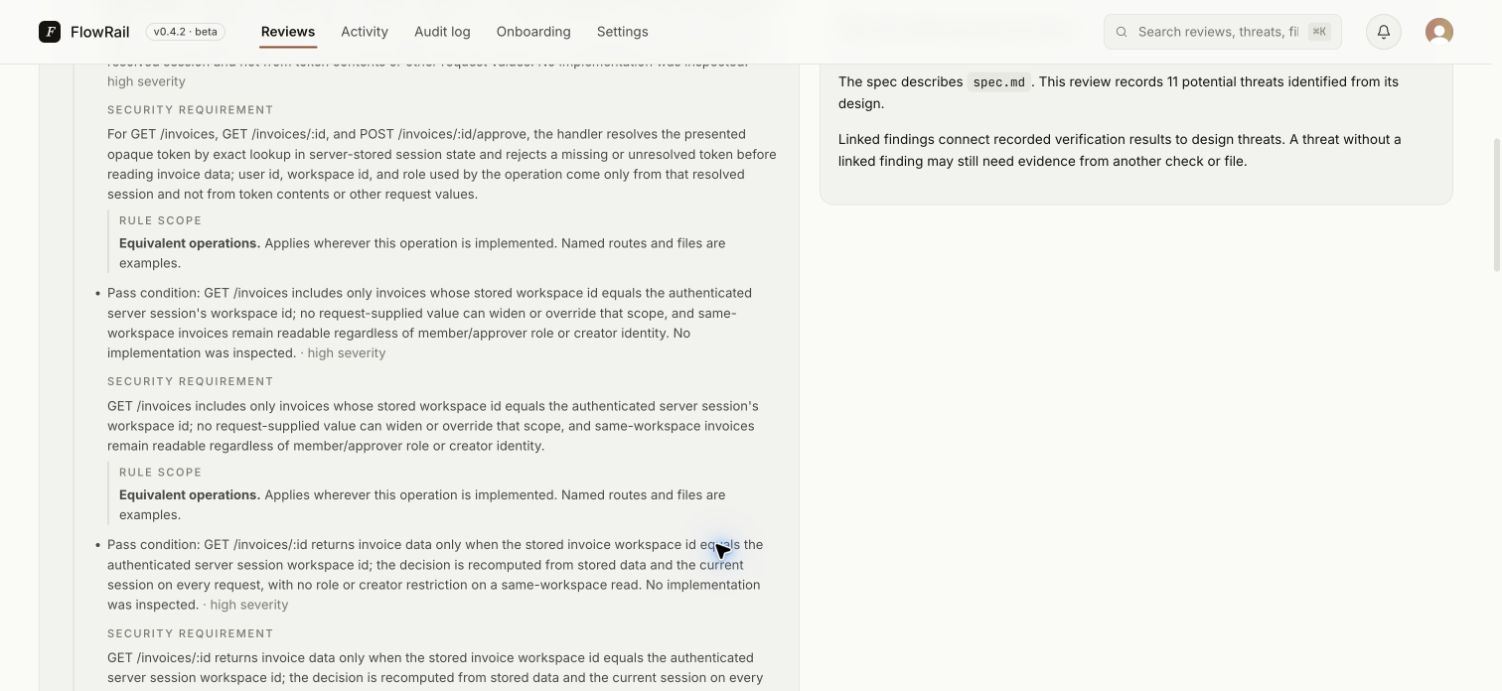
Bob asks the agent to review the design with FlowRail. The plan lives in a document such as spec.md: what the app does, who can use it, and what needs to stay private.
“Each business can only access its own invoices.”
FlowRail reviews that specification for risks and turns supported security requirements into rules for the relevant code. The privacy decision now has a check attached to it.
What does “review the design” mean?
The agent uses FlowRail’s MCP tools to submit the specification. FlowRail assesses the design, checks that generated security requirements are supported by the specification, and gives each rule a scope describing where it applies.
A design review identifies risks to address. It does not claim that code which hasn’t been checked is secure.
The wrong turn
gets an explanation.
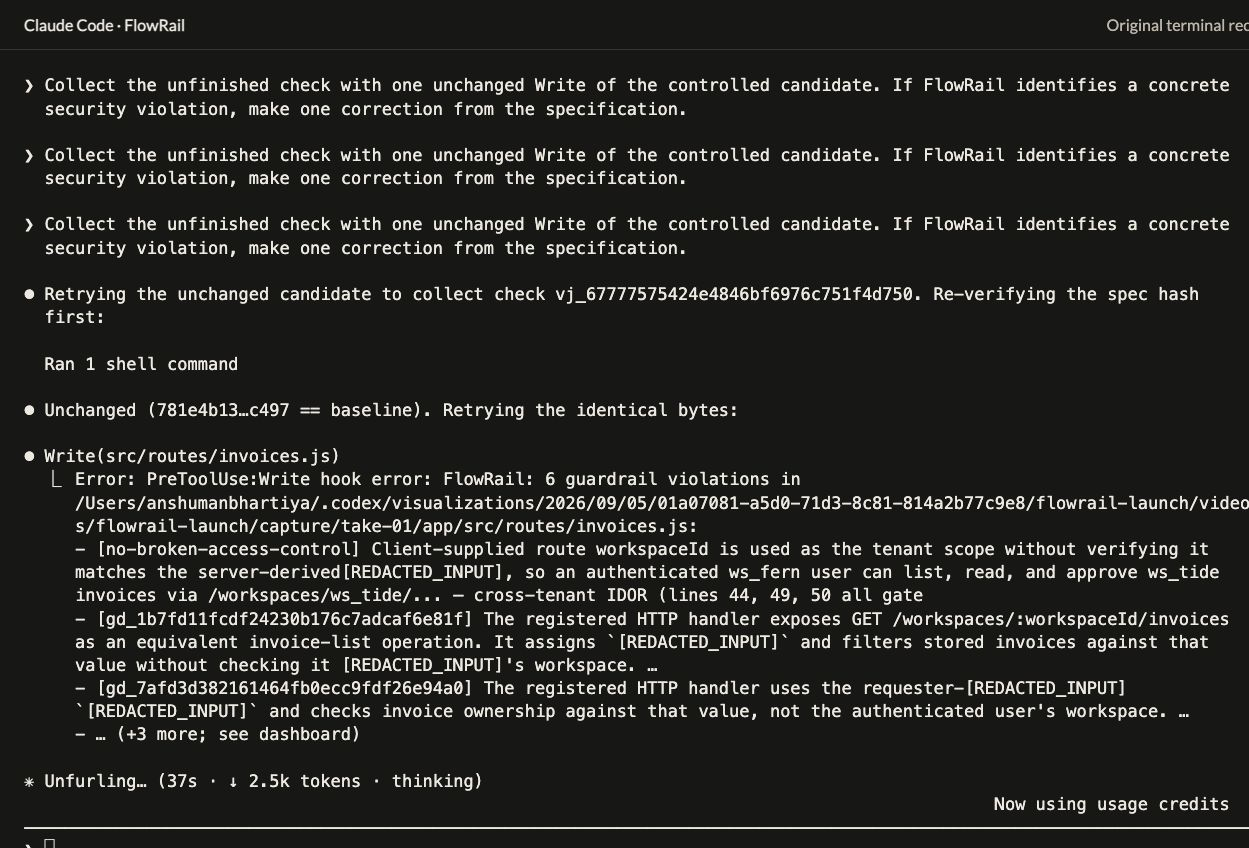
The agent proposes an invoice handler that trusts the business ID from the address. That conflicts with Bob’s privacy rule.
On a supported file write, a hook gives FlowRail the proposed code before it reaches disk. A detected violation blocks that write, and the finding goes back to the agent.
Check which business the signed-in user belongs to. Don’t let the address decide.
Plain-English explanation of the invoice-access finding shown in the recordings below.
See the actual blocked write
The agent can correct it.
Bob can follow it.
The finding gives the agent a concrete problem to fix. It can revise the code and submit the change for another check.
In the dashboard, Bob can follow the design requirement, the finding and subsequent check results. Requirements that still need evidence stay visible.
He has more than “the app seems to work.” He has an explanation of what was checked, what was stopped, and what still needs attention.
Look inside the reviewWatch the guardrail
do its job.
Here’s the real invoice-access walkthrough: a design review, a denied write, a correction, and the evidence left behind.
What this recording demonstrates
This controlled example deliberately introduced flawed code. Product fixes occurred between takes. The recorded correction passed 16 active checks and 23 separately run behavior tests; the overall review remained open. These are results from this example, not a detection-rate benchmark.
Bob is a fictional creator used to explain the workflow. This earlier invoice walkthrough and the September 20 product captures below are separate recorded runs.
Open the review.
See what happened.
The dashboard connects the reason for a check to what the check found. Here is the recorded requirement and its linked finding.
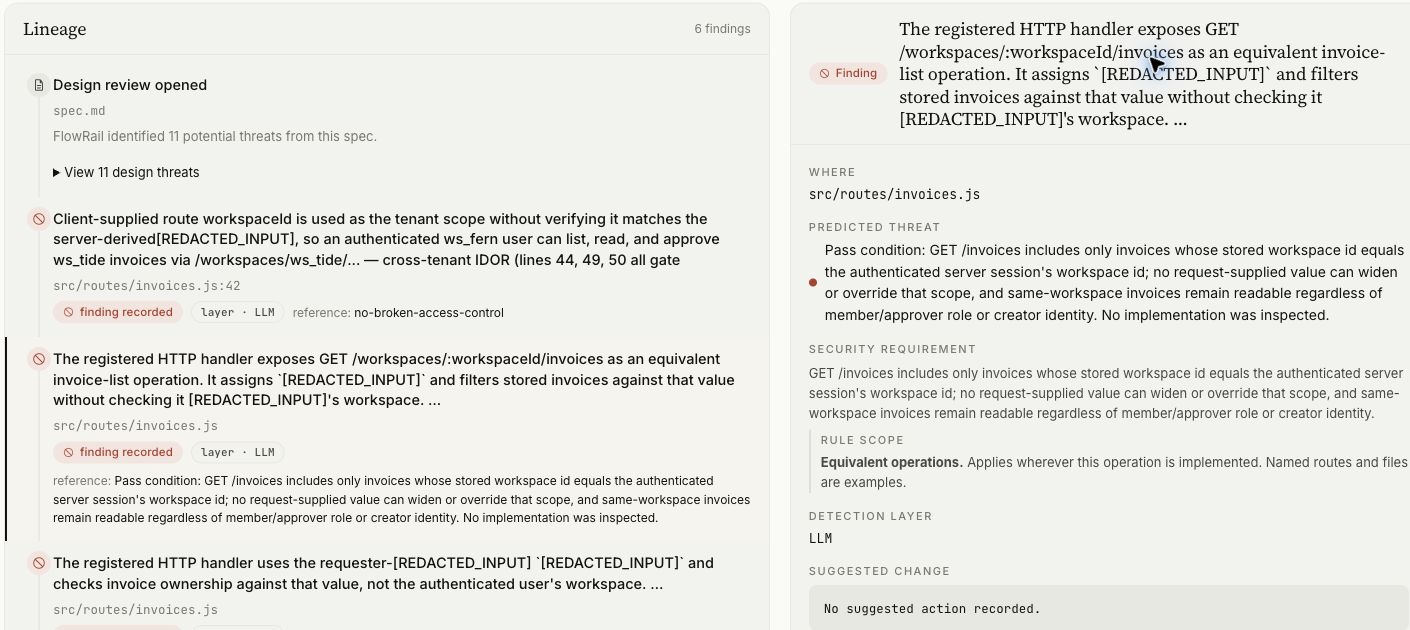
The agreement. Each business should only see its own invoices.
The finding. The proposed code uses the business ID from the request instead.
The connection. Bob can see which requirement the finding relates to, and where it occurred.
How to read a result that isn’t “passed”
- A violation was found.
- The proposed code breaks an applicable rule. The agent can correct it and try again.
- The check is incomplete.
- An incomplete design-bound check pauses the write. An unchanged retry can collect the result.
- More evidence is needed.
- “Not established” means this check could not confirm the requirement. It is distinct from finding a vulnerability or verifying that the requirement is satisfied.
This capture shows the requirement and findings from the September 20 recording. It does not show a successfully saved correction. A passing file check does not establish that the whole app is secure.
Three connections.
One continuous workflow.
FlowRail works with the agent Bob already uses. Each connection has a different job.
- 01 / Skills
Know when to ask.
Instructions help the agent review the specification, understand findings and follow the evidence.
- 02 / MCP tools
Bring in the review.
The agent calls FlowRail’s tools to review the design and work with its security requirements.
- 03 / Hooks
Check before saving.
A supported write triggers a code check. The result can allow the write, block a violation, or pause an unfinished design-bound check.
Does it only check rules from the design?
No. FlowRail combines deterministic checks, built-in security rules and rules derived from the specification. These layers serve different purposes; the design adds context such as who should be allowed to see an invoice.
Pilot projects can also use custom rules to express additional security requirements in plain English. Explore the documentation →
Where do AI models fit?
Design review, checking whether requirements match the specification, and reviewing code are distinct tasks. FlowRail has separate model settings for these phases, alongside checks that don’t rely on a model. The model choice can change without changing Bob’s workflow.
Does the system learn automatically?
FlowRail keeps findings, decisions and later evidence connected so people and agents can use that context. That is not the same as automatically retraining a model or guaranteeing that it will catch every future issue.
A shortcut shouldn’t
bring a known risk.
Agents install packages as they build. For supported package-install commands, FlowRail can check for known vulnerabilities and block a risky installation before it runs.
This recorded example shows a denied npm install. Coverage depends on the command and available advisory data.

A few practical details.
FlowRail connects your design requirements to the code your agent proposes. It reviews your specification, checks supported writes against applicable security rules, and keeps the findings and subsequent evidence together in a review.
The invited pilot is for individual builders. Claude Code is the released integration today; Codex is being tested, with more coding agents to follow. FlowRail uses skills, MCP tools and hooks, and each agent needs a compatible integration.
No. It means FlowRail found no violation of the rules checked for that proposed change, based on the code and context it could see. Requirements that still lack enough evidence remain unresolved, so the overall design review can stay open even after a write passes.
An incomplete design-bound check pauses the write and asks for a retry. The unchanged retry can collect the result. A pause is an operational state, not a vulnerability. Unbound writes can proceed on operational failures under the default scoped posture.
Yes. Your specification and candidate code are sent to FlowRail and its configured model provider for analysis. Read the privacy page before supplying sensitive code.
Yes. Share the installation guide with your agent and ask it to help with setup. The guide identifies which integration is available today and which steps are specific to it.
Keep creating.
Give the plan a guardrail.
Start with what you want to build. FlowRail helps check the security requirements as the code takes shape.