Catch unsafe code before your agent saves it.
Security checks tied to your designFlowRail turns your design’s security requirements into checks for your coding agent. It can block supported file writes that break those rules, with an explanation of what went wrong.
Invited pilot for individual builders. Claude Code integration is available today; Codex is being tested, with more coding agents to follow.

Your security requirements, checked against the code.
A privacy rule.
A real blocked write.
An invoice app should keep each business’s invoices private. In this recorded test, the proposed code let an address parameter decide whose invoices to show. FlowRail blocked the write.
The requirement
Each business should only see its own invoices.
View the recorded requirementThe violation
The code trusted the business ID in the address instead of checking the signed-in user’s business.
Write blocked before savingThe evidence
The dashboard links the finding and affected file back to the design requirement.
View the recorded evidence
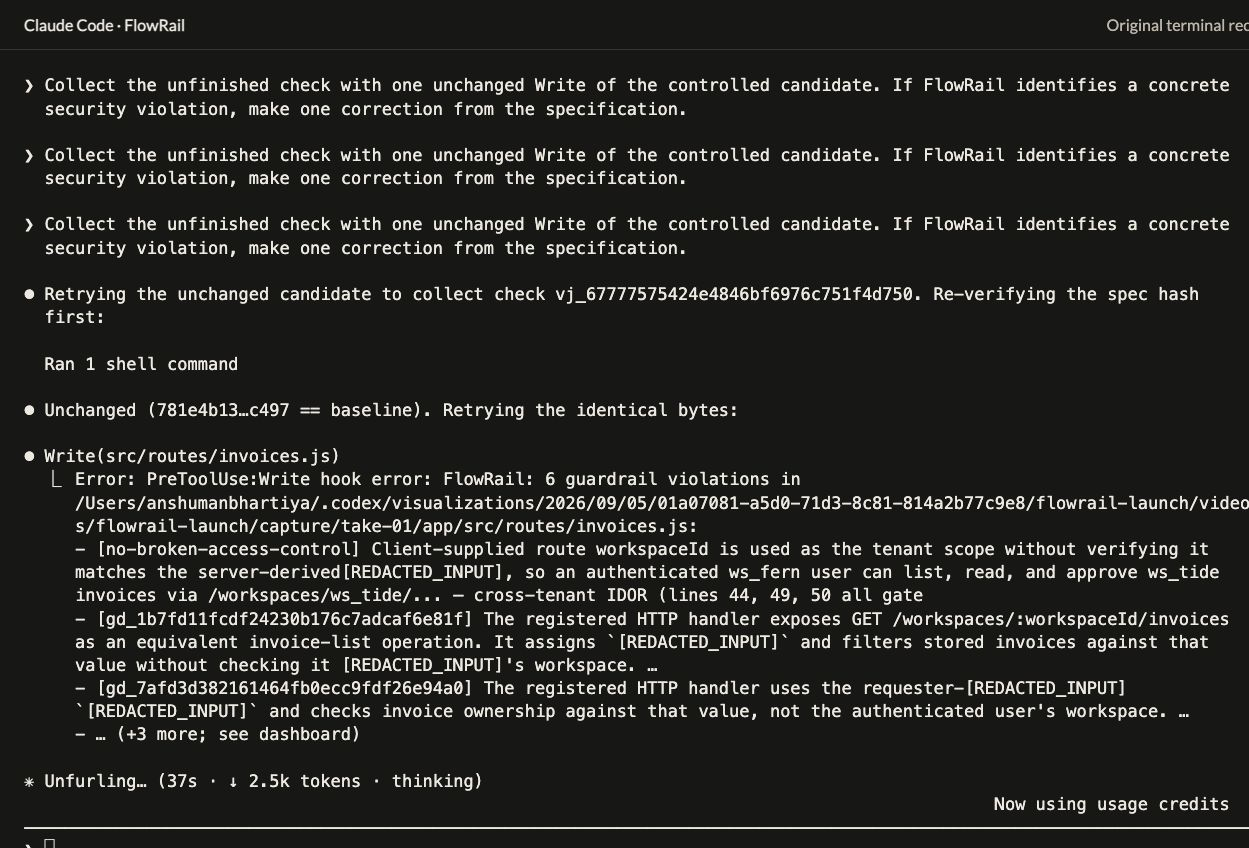
The write stops here.
The highlighted
Writecall and hook error show FlowRail returning six violations before this file was saved.Here’s what broke the rule.
The highlighted finding says the code trusted a business ID in the URL. Changing it could let one business access another’s invoices.
Highlights, arrows and explanatory notes added.Open original at full size
The agent receives the finding and can correct the code before trying again. You can inspect the evidence yourself.
Watch the full walkthroughThis controlled test deliberately introduced flawed code. These captures show a denied write and its linked findings; the review remained open.
An idea worth sharing.
Follow Bob as he builds with Claude Code and discovers how FlowRail checks the code against his plan.
Keep your AI
true to the plan.
Set it up.
Keep building.
Install FlowRail in your project with npm, connect a supported coding agent, and ask for a review of your design spec. From there, FlowRail checks supported file writes as your agent works.
- Skills
Guide the agent.
FlowRail’s skills help your agent review your spec, understand findings and follow the evidence as implementation changes.
- MCP tools
Connect the checks.
Your agent connects to FlowRail’s review and verification tools. Supported security requirements become scoped rules tied to your design.
- Hooks
Check before saving.
FlowRail checks supported Write/Edit operations before they reach disk. It can allow the write or block a violation; incomplete design-bound checks pause for a retry.
What happens
while Bob is building?
Follow his invoice app from a privacy decision to a blocked change. See how the agent gets feedback, and what Bob can check for himself.
Explore how it worksFlowRail connects your design requirements to the code your agent proposes. It reviews your specification, checks supported writes against applicable security rules, and keeps the findings and subsequent evidence together in a review.
The invited pilot is for individual builders. Claude Code is the released integration today; Codex is being tested, with more coding agents to follow. FlowRail uses skills, MCP tools and hooks, and each agent needs a compatible integration.
No. It means FlowRail found no violation of the rules checked for that proposed change, based on the code and context it could see. Requirements that still lack enough evidence remain unresolved, so the overall design review can stay open even after a write passes.
An incomplete design-bound check pauses the write and asks for a retry. The unchanged retry can collect the result. A pause is an operational state, not a vulnerability. Unbound writes can proceed on operational failures under the default scoped posture.
Yes. Your specification and candidate code are sent to FlowRail and its configured model provider for analysis. Read the privacy page before supplying sensitive code.
Yes. Share the installation guide with your agent and ask it to help with setup. The guide identifies which integration is available today and which steps are specific to it.
Stay in your flow.
Bring security guardrails to your next creation.